

As SQL databases grow, writing long queries repeatedly becomes inefficient and hard to manage. To solve this, SQL provides reusable database objects such as Views, Stored Procedures, and Functions.
These objects help you:
- Simplify complex queries
- Improve performance
- Enhance security
- Reduce repeated code
- Maintain clean database logic
This article explains each concept clearly, shows when to use them, and demonstrates how they work together in real-world database systems.
What Are SQL Views?
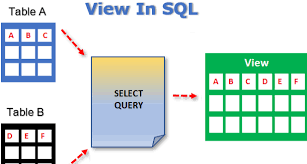
A View is a virtual table created from a SQL query. It does not store data itself but displays data dynamically from underlying tables.
Example:
CREATE VIEW ActiveCustomers AS
SELECT CustomerID, FullName, Email
FROM Customers
WHERE IsActive = 1;
You can query a view like a table:
SELECT * FROM ActiveCustomers;
Why Use Views?
- Simplify complex queries
- Hide sensitive columns
- Improve readability
- Centralize business logic
Views are commonly used in reporting and dashboards.
Advantages and Limitations of Views
Advantages
- Easier querying
- Better security
- Cleaner SQL code
- Reusable logic
Limitations
- No data storage
- Some views are not updatable
- Performance issues if overused
Views are best for read-heavy operations, not heavy inserts or updates.
What Are Stored Procedures?
A Stored Procedure is a saved SQL script that can accept parameters, execute logic, and return results.
Example:
CREATE PROCEDURE GetCustomerOrders
    @CustomerID INT
AS
BEGIN
    SELECT *
    FROM Orders
    WHERE CustomerID = @CustomerID;
END;
Execute it:
EXEC GetCustomerOrders 5;
Why Use Stored Procedures?
- Faster execution
- Reduced network traffic
- Better security
- Centralized logic
They are widely used in enterprise systems and backend applications.
Using Parameters in Stored Procedures
Parameters make stored procedures dynamic and reusable.
Example:
CREATE PROCEDURE AddEmployee
    @Name VARCHAR(100),
    @Salary DECIMAL(10,2)
AS
BEGIN
    INSERT INTO Employees (Name, Salary)
    VALUES (@Name, @Salary);
END;
Parameters allow the same procedure to handle multiple inputs safely.
What Are SQL Functions?
A Function returns a value and is often used inside SELECT statements.
Types of Functions:
- Scalar Functions → Return a single value
- Table-Valued Functions → Return a table
Example (Scalar):
CREATE FUNCTION CalculateTax (@Amount DECIMAL(10,2))
RETURNS DECIMAL(10,2)
AS
BEGIN
    RETURN @Amount * 0.05;
END;
Use it:
SELECT dbo.CalculateTax(1000);
Functions are ideal for calculations and transformations.
Functions vs Stored Procedures

| Feature | Function | Stored Procedure |
|---|---|---|
| Returns value | Yes | Optional |
| Used in SELECT | Yes | No |
| Accepts parameters | Yes | Yes |
| Modifies data | No (usually) | Yes |
| Performance | Lightweight | More powerful |
Choosing the right tool improves database design.
Security Benefits of Stored Procedures and Views
Using views and stored procedures enhances security by:
- Preventing direct table access
- Limiting exposed columns
- Controlling allowed operations
- Reducing SQL injection risks
Instead of granting table access, you grant access to procedures and views.
Real-World Example Using All Three
Step 1: Create a View
CREATE VIEW MonthlySales AS
SELECT MONTH(OrderDate) AS Month, SUM(TotalAmount) AS Sales
FROM Orders
GROUP BY MONTH(OrderDate);
Step 2: Create a Function
CREATE FUNCTION Bonus (@Sales DECIMAL(10,2))
RETURNS DECIMAL(10,2)
AS
BEGIN
    RETURN @Sales * 0.1;
END;
Step 3: Create a Stored Procedure
CREATE PROCEDURE GetSalesBonus
AS
BEGIN
    SELECT Month, Sales, dbo.Bonus(Sales) AS Bonus
    FROM MonthlySales;
END;
This structure keeps logic clean, reusable, and professional.
Conclusion
Views, Stored Procedures, and Functions are essential tools for writing clean, reusable, and secure SQL code. They help transform simple databases into scalable, enterprise-ready systems.
Mastering these concepts moves you beyond basic querying and prepares you for real-world database development, backend systems, and advanced analytics.