
Most Excel users write formulas using cell references such as A2, B15, or D20. As spreadsheets become larger, those references become difficult to understand.
For example, compare these two formulas:
=SUM(B2:B15)
=SUM(Sales_Amount)
The second formula is much easier to read.
That is the benefit of Named Ranges.
What Are Named Ranges?
A Named Range is a custom name given to a cell or group of cells.
Instead of referring to cells by their location, you refer to them by a meaningful name.
Examples:
- Sales_Amount
- Employee_List
- Tax_Rate
- Monthly_Profit
This makes formulas easier to understand and manage.
Why Named Ranges Matter
Named ranges become especially useful when:
- Your workbook has many formulas
- Several people use the same file
- You need to create professional spreadsheets
- You use lookup functions often
Without named ranges, formulas can quickly become confusing.
For example:
=IF(C2>$F$1,C2*$G$1,C2)
After using named ranges:
=IF(C2>Target_Sales,C2*Bonus_Rate,C2)
The second version is much clearer.
How to Create a Named Range
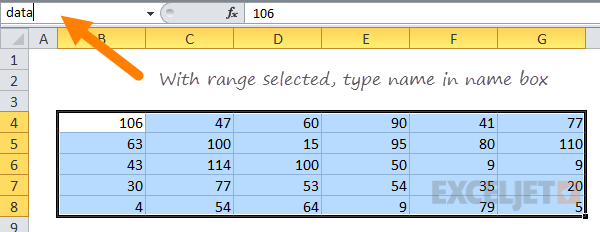
- Select the cell or range
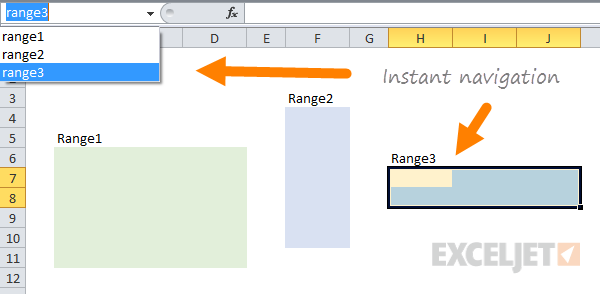
- Click in the Name Box beside the formula bar
- Type a name
- Press Enter
You can also create names through:
Formulas → Define Name
Rules for Naming
A named range:
- Cannot contain spaces
- Cannot start with a number
- Should be short but descriptive
Good examples:
- TotalSales
- TaxRate
- EmployeeNames
Bad examples:
- Data1
- CellRange
- 2024Sales
Dynamic Named Ranges
One advanced technique is creating dynamic named ranges.
These automatically expand when new data is added.
For example, if you keep adding sales records every month, a dynamic named range updates automatically without needing to change the formula.
This is very useful for:
- Charts
- Drop-down lists
- Dashboards
- Lookup tables
Best Uses for Named Ranges
Named ranges are especially useful in:
- Financial models
- Budget templates
- Dashboards
- Complex formulas
- Data validation lists
They make your workbook look more professional and easier to maintain.
Conclusion
Named ranges may seem like a small feature, but they can make a huge difference in large spreadsheets. They improve readability, reduce confusion, and help you build formulas that are easier to understand.
If your formulas are starting to look messy, named ranges are one of the best ways to simplify them.