
Older Excel formulas usually return one result in one cell. Dynamic Array formulas are different. They can return multiple results automatically into several cells.
This is one of the biggest changes in modern Excel.
Instead of copying formulas down row by row, one formula can fill an entire range automatically.
What Are Dynamic Arrays?
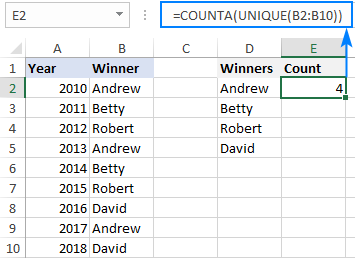
Dynamic Arrays are formulas that spill results into nearby cells.
For example, if you use:
=UNIQUE(A2:A20)
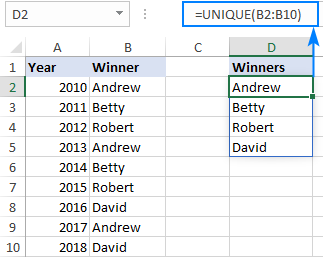
Excel automatically creates a list of all unique values from that range.
You do not need to copy the formula downward.
The results spill automatically.
Why Dynamic Arrays Are Useful
Dynamic arrays help you:
- Save time
- Use fewer formulas
- Create cleaner spreadsheets
- Build more interactive reports
They are especially useful for lists that change often.
Important Dynamic Array Functions
UNIQUE
Returns only unique values.
Example:
=UNIQUE(A2:A100)
Useful for:
- Unique customer lists
- Product categories
- Department names
FILTER
Returns only rows that meet a condition.
Example:
=FILTER(A2:D100,D2:D100=”Completed”)
This returns only completed records.
SORT
Sorts a list automatically.
Example:
=SORT(A2:A20)
SORTBY
Sorts one range using another range.
Example:
=SORTBY(A2:A20,B2:B20,-1)
This sorts the first range by the second range in descending order.
SEQUENCE
Creates a list of numbers automatically.
Example:
=SEQUENCE(12)
This produces the numbers 1 to 12.
Combining Dynamic Array Functions
The real power comes from combining them.
For example:
=SORT(UNIQUE(A2:A100))
This creates a sorted list of unique values.
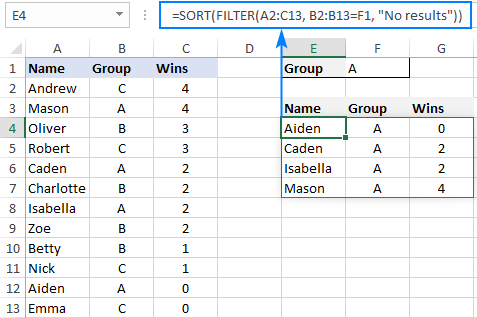
You can also combine FILTER and SORT:
=SORT(FILTER(A2:D100,D2:D100=”Completed”))
This returns only completed records and sorts them automatically.
Common Mistakes
Dynamic arrays can produce a #SPILL! error.
This usually happens because:
- Another value is blocking the spill range
- Merged cells are in the way
- There is not enough space for the results
To fix it, clear the cells around the formula.
Conclusion
Dynamic Array formulas are one of the most important modern Excel features. They make formulas faster, cleaner, and more powerful.
If you still copy formulas down row by row, learning dynamic arrays can completely change the way you use Excel.