
Generating a report is only half the job.
The other half is making sure it reaches the right people at the right time.
In most organizations, report delivery still happens manually. Someone generates the file, opens their email client, attaches the document, writes a message, and sends it to a distribution list. This process repeats every day, week, or month.
Python eliminates this repetition entirely.
With a few lines of code, Python can compose a professional email, attach reports and charts, customize the message, and send it automatically to any number of recipients.
Why Automate Email Reporting?
Manual email delivery is not just tedious — it introduces delays and inconsistencies.
Reports may be sent late because the analyst is unavailable. Attachments may be forgotten. The wrong version of a file may be attached.
Automated email delivery ensures reports go out on schedule, with the correct files attached, every single time.
Benefits of Email Automation
- Reports delivered consistently without manual effort
- Scheduled delivery at optimal times for recipients
- Customized messages based on report content
- Reduced risk of human error in delivery
Python Libraries for Email Automation
Python includes built-in libraries that handle email sending without any additional installation required.
smtplib
The smtplib library connects Python to email servers using the SMTP protocol.
python
import smtplibWhat It Is Used For
- Connecting to Gmail, Outlook, or corporate email servers
- Authenticating and sending messages
email.mime
The email.mime module structures the email content, including body text and attachments.
python
from email.mime.multipart import MIMEMultipart
from email.mime.text import MIMEText
from email.mime.base import MIMEBase
What It Is Used For
- Composing professional email messages
- Attaching files such as PDFs, CSVs, and Excel reports
Sending a Basic Automated Email
The following example sends a simple email through Gmail.
python
import smtplib
from email.mime.text import MIMEText

sender = "[email protected]"
recipient = "[email protected]"
password = "your_app_password"

message = MIMEText("Please find the attached weekly sales report.")
message["Subject"] = "Weekly Sales Report"
message["From"] = sender
message["To"] = recipient

with smtplib.SMTP_SSL("smtp.gmail.com", 465) as server:
    server.login(sender, password)
    server.sendmail(sender, recipient, message.as_string())

print("Email sent successfully.")
What This Does
- Connects to Gmail’s SMTP server securely
- Authenticates with the sender’s credentials
- Composes and sends the email
Attaching Reports and Dashboards
Most automated emails include file attachments — CSV exports, charts, or PDF summaries.
python
import smtplib
from email.mime.multipart import MIMEMultipart
from email.mime.text import MIMEText
from email.mime.base import MIMEBase
from email import encoders

sender = "[email protected]"
recipient = "[email protected]"
password = "your_app_password"

message = MIMEMultipart()
message["Subject"] = "Monthly Revenue Report"
message["From"] = sender
message["To"] = recipient

body = MIMEText("Please find the monthly revenue report attached.")
message.attach(body)

with open("monthly_revenue_report.pdf", "rb") as file:
    attachment = MIMEBase("application", "octet-stream")
    attachment.set_payload(file.read())
    encoders.encode_base64(attachment)
    attachment.add_header("Content-Disposition", "attachment", filename="monthly_revenue_report.pdf")
    message.attach(attachment)

with smtplib.SMTP_SSL("smtp.gmail.com", 465) as server:
    server.login(sender, password)
    server.sendmail(sender, recipient, message.as_string())
What This Does
- Composes an email with a plain text body
- Reads the PDF report file and encodes it as an attachment
- Sends the complete email with the file attached
Customizing Messages Dynamically
Automated emails can be personalized based on the content of the report.
python
total_revenue = 128400
region = "North"

body_text = f"The {region} region generated ${total_revenue:,} in revenue this month."

body = MIMEText(body_text)
message.attach(body)
What This Does
Inserts actual data values into the email body, making each automated message informative and specific rather than generic.
Sending to Multiple Recipients
Python can send the same email to an entire distribution list.
python
recipients = ["[email protected]", "[email protected]", "[email protected]"]

message["To"] = ", ".join(recipients)

server.sendmail(sender, recipients, message.as_string())
What This Does
Delivers the report to every recipient in the list with a single script execution.
Business Reporting Workflows

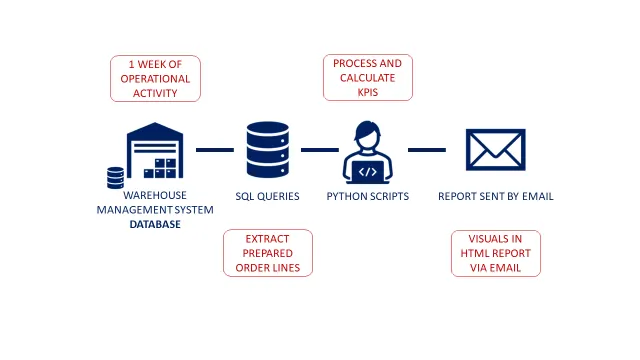
A complete automated reporting workflow typically combines everything covered so far:
- A Python script queries the database for the latest data
- Pandas cleans and summarizes the results
- Matplotlib generates updated charts and saves them as images
- The report is compiled into a PDF or Excel file
- smtplib emails the final report to the distribution list automatically
This entire process can be triggered by a single scheduled task, running without any human involvement.
Security Considerations
When automating emails, credentials must be handled carefully.
- Never hardcode passwords directly in scripts
- Use environment variables to store sensitive credentials
- For Gmail, use App Passwords rather than account passwords
- Consider OAuth2 for enterprise environments
Best Practices
- Test email scripts with a personal inbox before deploying to a distribution list
- Include a timestamp in the subject line so recipients can identify report periods
- Keep email body text concise and professional
- Log each successful send with a timestamp for auditing
Conclusion
Email automation with Python removes the manual effort of report delivery from end to end. By combining smtplib, the email.mime module, and Python’s data processing capabilities, professionals can build workflows that generate, compile, and distribute reports automatically on any schedule.
When delivery is automated, data reaches the right people at the right time — every time — without anyone needing to remember to send it.