

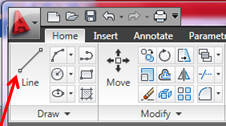
- Specify the start point
- Do one of the following to specify the length
- Click a point to specify the start point.
- Enter the length of the line, for example 100
- Do one of the following to specify the angle
- Enter the left angle bracket (<) and the angle, for example <65, and move the cursor to indicate the direction.
- Move the cursor to indicate the angle