

Do you know you may not need to be a professional graphic designer before you can design cover for your book or written article?
Below reveals the secret to the above question.
Cover page is the front and back pages of a book. These are expected to be nice looking because it is the first key attraction to the intending reader of your book.
You do not need to hire a professional to design cover page for you. With Microsoft Word you are good to do the design yourself.
The first thing you need is to ensure that Microsoft Word is properly installed on your system.
Then, how do you lunch Microsoft Word?
Follow these steps:
- Click on Start MENU
- All Programs
- Click on Microsoft Word
What next?
Once it opens, click on INSERT. Then, click on Cover Page. Under the Cover Page, you can select any of the ready-made design. But the beauty of it is that you can edit it to suit what you want.
Is that not cool?
To edit any of the ready-made design, for instance image; right click on it and select change picture. With this you can select any suitable picture from the saved directory.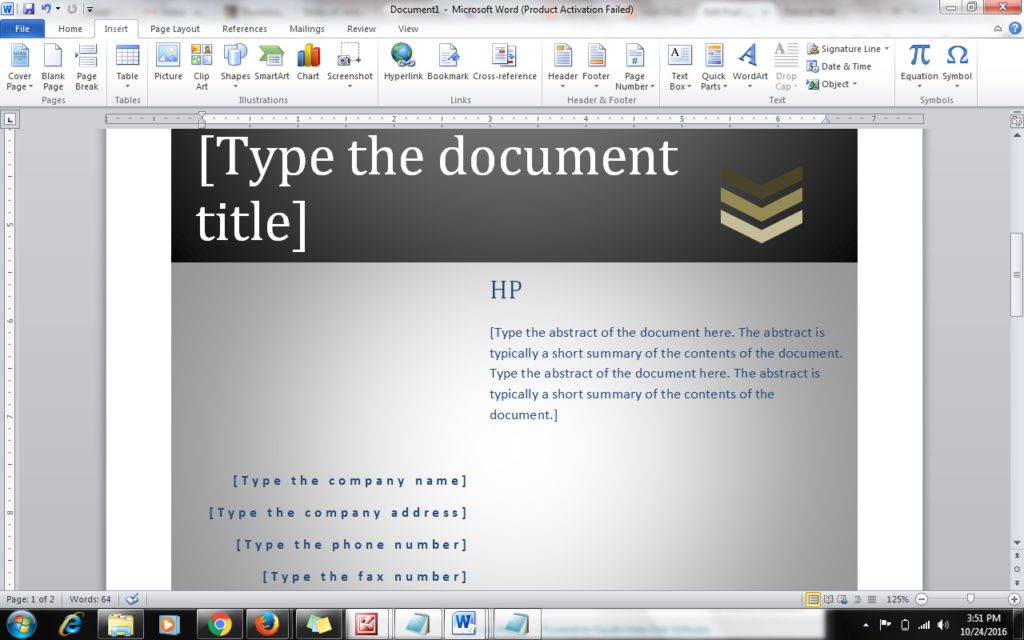
Also, you will see where title tile document is, click on it to change it to the title of your book. You can as well add preface of the book to it by clicking on the next box to the title…
Note: you can right click on your cover page and further edit it by clicking on the desired option.
Having followed the above prescribed steps, then you are good to go with your cover page while smiling at the great job you just did.