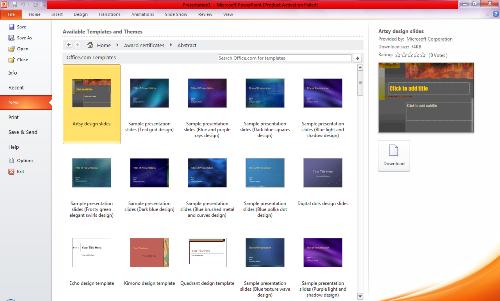
Good Evening.
Today, I will be teaching you how you can conveniently use template in Microsoft powerpoint.
At first, let’s quickly take a look at what template is.
A PowerPoint template is a pattern or blueprint of a slide or group of slides that you save as a .potx file. Templates can contain layouts (layout: The arrangement of elements, such as title and subtitle text, lists, pictures, tables, charts, shapes, and movies, on a slide.), theme colors (theme colors: A set of colors that is used in a file. Theme colors, theme fonts, and theme effects compose a theme.), theme fonts (theme fonts: A set of major and minor fonts that is applied to a file. Theme fonts, theme colors, and theme effects compose a theme.), theme effects (theme effects: A set of visual attributes that is applied to elements in a file. Theme effects, theme colors, and theme fonts compose a theme.), background styles, and even content.
Note: you can create your own custom templates and store them, reuse them, and share them with others. Additionally, you can find many different types of free templates built-in to PowerPoint, and hundreds on Office.com and on other partner Web sites that you can apply to your presentation.
Some examples of templates on Office.com include, but are not limited to, the following:
| Agendas | Award certificates | Brochures |
| Budgets | Business cards | Calendars |
| Content slides | Contracts | Databases |
| Design slides | Diagrams | Envelopes |
| Expense reports | Fax sheets | Flyers |
| Forms | Gift certificates | Greeting cards |
| Inventories | Invitations | Invoices |
| Labels | Letters | Lists |
| Memos | Minutes | Newsletters |
| Plans | Planners | Postcards |
| Purchase orders | Receipts | Reports |
| Resumes | Schedules | Schedules |
| Statements | Stationary | Time sheets |
Most templates include the following components:
Subject matter-specific content, such as Certificate of Achievement, Soccer, and the soccer ball image
Background formatting, such as pictures, texture, gradient or solid fill color, and transparency. This example shows the light blue solid fill background
Color, fonts, effects (3-D, lines, fills, shadows, etc.), and theme design elements (such as the color and gradient effects inside the word Soccer)
Text in placeholders that prompt people to enter specific information, such as Player’s name, Name of coach, Date of presentation, and any variable, such as the year (2007)
Having understood what template is. Let’s us look into how to apply it to our powerpoint work.
When you want your presentation to contain thoughtful arrangement of elements and color, fonts, effects, style, and layout (layout: The arrangement of elements, such as title and subtitle text, lists, pictures, tables, charts, AutoShapes, and movies, on a slide.) to your plain slides, apply a template (template: A file or set of files that contains information about the theme, layout, and other elements of a finished presentation.) (.potx file). This will give you a jump-start on a new, blank presentation.
To apply a template, follow these steps:
- On the File tab, click New.
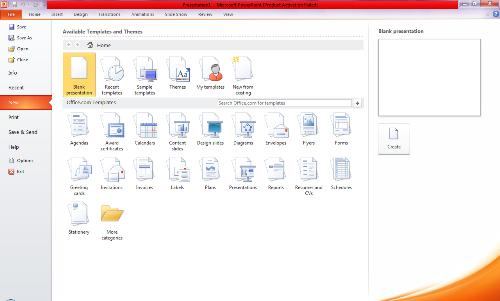
- Under Available Templates and Themes, do one of the following:
- To reuse a template that you’ve recently used, click Recent Templates.
- To use a template that you installed to your local drive previously, click My Templates, click the template that you want, and then click OK.
- Under com Templates, click a template category, select a template, and then click Download to download the template from Office.com to your local drive.