
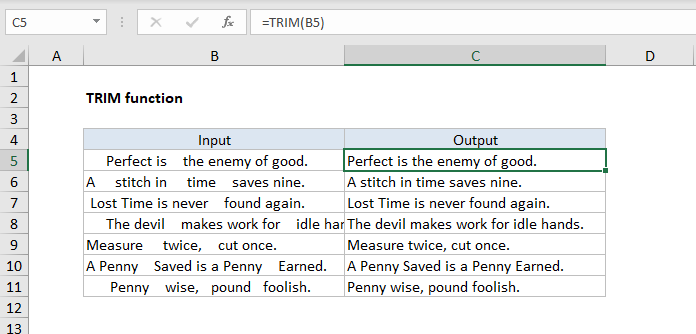
The Excel TRIM function strips extra spaces from text, leaving only a single space between words and no space characters at the start or end of the text.
USES
Remove extra spaces from the text
Return value
Text with extra spaces removed.
Syntax
=TRIM (text)
Arguments
- text – The text from which to remove extra space.
Usage notes
The TRIM function strips extra spaces from text, leaving only a single space between words, and removing any leading or trailing space. For example:
=trim (" A stitch in time. ") // returns "A stitch in time."
The TRIM function can be used together with the CLEAN function to remove extra space and strip out other non-printing characters:
=trim(clean(A1)) // trim and clean
TRIM often appears in other more advanced text formulas. For example, the formula below will count the number of words in cell A1:
len(trim(A1))-len(substitute (A1," ","")) +1
Because this formula depends on single spaces to get an accurate word count, TRIM is used to normalize space before the count is calculated
Notes
- TRIM strips extra spaces from text, leaving only single spaces between words and no space characters at the start or end of the text.
- TRIM is useful when cleaning up text that has come from other applications or environments.
- TRIM only removes the ASCII space character (32) from the text.
- Unicode text often contains a non-breaking space character (160) that appears on web pages as an HTML entity. This will not be removed with TRIM.
- The clean function strips the first 32 non-printing characters (ASCII values 0 through 31) from the text.