by Oluwaseun | Jun 29, 2019 | Articles and Short Tutorials, Microsoft Powerpoint Articles
here are times while building a slide deck, you may need to delete some slides. This can be done easily from PowerPoint. You can delete the slides from the Normal view as well as the Slide Sorter view. In each view, you can delete the slides in two ways. Deleting from...
by Oluwaseun | Jun 29, 2019 | Articles and Short Tutorials, Microsoft Powerpoint Articles
his chapter will teach you how to add new text boxes in a slide. Most of the standard layouts come with the text box option. As mentioned in the previous chapter, text boxes will have “Click to add text” as the default text. Here are the steps to add new...

by Oluwaseun | Jun 29, 2019 | Articles and Short Tutorials, Microsoft Powerpoint Articles
PowerPoint allows users to add text to the slide in a well-defined manner to ensure the content is well distributed and easy to read. The procedure to add the text in a PowerPoint slide is always the same – just click in the text box and start typing. The text...
by Oluwaseun | Jun 29, 2019 | Articles and Short Tutorials, Microsoft Powerpoint Articles
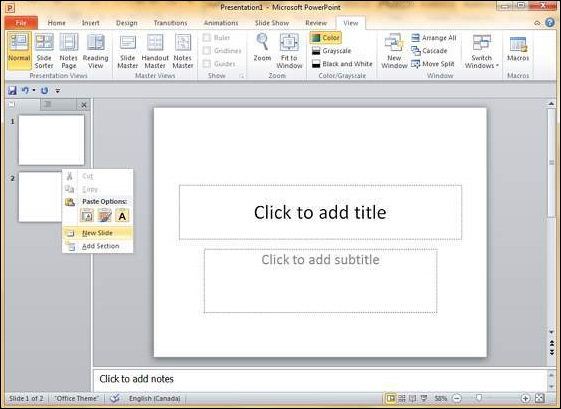
Step 1 − Right-click in the Navigation Pane under any existing slide and click on the New Slide option. Step 2 − The new slide is inserted. You can now change the layout of this slide to suit your design requirements. Step 3 − To change the slide layout, right-click...

by Oluwaseun | Jun 29, 2019 | Articles and Short Tutorials, Microsoft Powerpoint Articles
PowerPoint offers a host of tools that will aid you in creating a presentation. These tools are organized logically into various ribbons in PowerPoint. The table below describes the various commands you can access from the different menus. Menu Category Ribbon...
