Oracle Primavera is a Project Management and Planning Software.
The installation process guides you through setting up the PM module on your computer.
Start the Project Management module
Click Start, then choose All Programs, Oracle – Primavera P6, Project Management.
Log in
Before using the module, you must enter a valid login name and password. If you do not know your login name and password, see your system administrator.
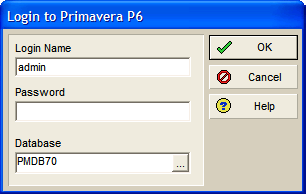 Take note that:
Passwords are case-sensitive and depend on selections in the Admin Preferences dialog box.
If the Enable Password Policy check box is marked in the Admin Preferences dialog box, you are required to enter a password with a minimum length of 8 characters, including one letter and one numeric character.
If the Enable Password Policy check box is cleared in the Admin Preferences dialog box, you are required to enter a password of up to 20 characters in length.
Your login name can be up to 20 characters in length.
Use the optional Welcome dialog box to create a new project, open an existing project, open the last open project, or open only global data (EPS, projects, roles, resources, calendars, etc.).

Mark the Do Not Show This Window Again checkbox if you do not want the Welcome dialog box to appear each time you open the module. The last project used automatically opens at startup. To turn this option back on, choose Edit, User Preferences, then click the Application tab and mark the Show the Welcome Dialog at Startup checkbox.

