
by dayo ade | Oct 9, 2017 | Articles and Short Tutorials, Web Design Tutorials and Articles
Example <!DOCTYPE html> <html> <body> <h2>Spectacular Mountain</h2> <img src=”pic_mountain.jpg” alt=”Mountain View” style=”width:304px;height:228px;”> </body> </html> HTML Images...

by dayo ade | Oct 9, 2017 | Articles and Short Tutorials, Web Design Tutorials and Articles
HTML Links – Hyperlinks HTML links are hyperlinks. You can click on a link and jump to another document. When you move the mouse over a link, the mouse arrow will turn into a little hand. Note: A link does not have to be text. It can be an image or any other...

by dayo ade | Oct 9, 2017 | Articles and Short Tutorials, Web Design Tutorials and Articles
Styling HTML with CSS CSS stands for Cascading Style Sheets. CSS describes how HTML elements are to be displayed on screen, paper, or in other media. CSS saves a lot of work. It can control the layout of multiple web pages all at once. CSS can be added to HTML...

by dayo ade | Oct 9, 2017 | Articles and Short Tutorials, Web Design Tutorials and Articles
Color Names In HTML, a color can be specified by using a color name: Tomato Orange DodgerBlue MediumSeaGreen Gray SlateBlue Violet LightGray Background Color You can set the background color for HTML elements: Hello World Lorem ipsum dolor sit amet,...
by dayo ade | Oct 9, 2017 | Articles and Short Tutorials, Web Design Tutorials and Articles
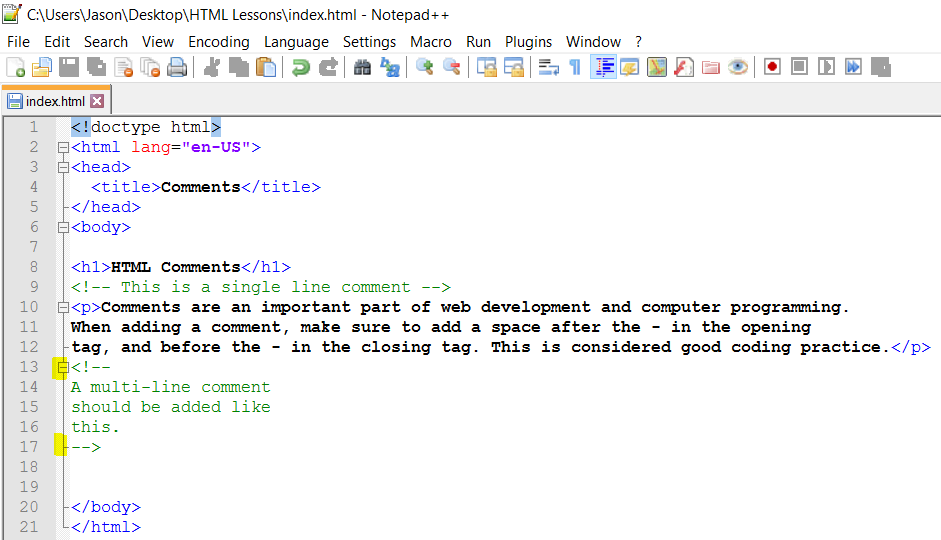
HTML Comment Tags You can add comments to your HTML source by using the following syntax: <!– Write your comments here –> Notice that there is an exclamation point (!) in the opening tag, but not in the closing tag. Note: Comments are not displayed...
