08033146625, 08092566265 training@ictacademy.com.ng
  • Facebook
  • X
  • Instagram
  • Facebook
  • X
  • Instagram
  • Gallery
  • About Us
    • Resources
      • IT Jobs
      • Articles
      • Tutorials
      • Software Download
      • Ebooks Downloads
      • Free ICT Seminars
      • Certificate Verification
    • Faculties
    • Go Social
    • Current Vacancies
    • Ex Student Employers
MEGATEK ICT ACADEMY
  • Upcoming Classes
  • Courses
    • Cybersecurity
    • Cloud Computing
    • Artificial Intelligence
    • DevOps
    • Digital Marketing
    • Building Information Modelling (BIM)
    • Computer Aided Design (CAD)
    • Programming (Coding)
    • Microsoft Office
    • Data Analysis
    • Data Science
    • Project Management
    • Software Development
    • Web Development
    • Product Design
    • Database Management and Admin
    • Mobile Apps Development
    • Branding/Graphics Design
    • Networking/Hardware
    • Machine Learning
    • Finance/Accounting
    • Oil & Gas
    • Business Analysis
  • Training
    • Corporate Training
    • Virtual Training
  • Events
    • Digital-Bootcamp-For-Women
    • 2nd ICT Quiz Competition for Public Primary Schools in Ikorodu
  • IT Certifications
  • Online Training
  • Articles
  • Gallery
  • Contact Us
  • LOGIN
Select Page

Adding Slide Notes On PowerPoint

by Oluwaseun | Jun 29, 2019 | Articles and Short Tutorials, Microsoft Powerpoint Articles

Slide notes can be very useful tools for presentation. These notes are not displayed on the screen in the Slideshow mode, but the presenter can see them so they can prepare well to present the slides. Depending on your Print settings, you can also print the slide...
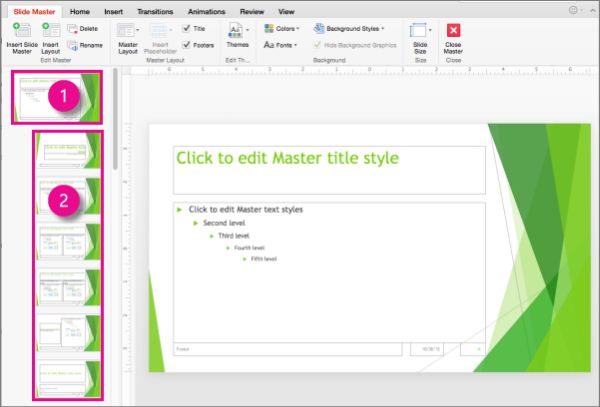
How To Rearrange Slides in PowerPoint

How To Rearrange Slides in PowerPoint

by Oluwaseun | Jun 29, 2019 | Articles and Short Tutorials, Microsoft Powerpoint Articles

You can rearrange slides from two views in PowerPoint – Normal View and Slide Sorter View. Given below are the steps to rearrange slides from different views. Normal View Step 1 − Select the slide to be moved. Step 2 − Left click on the slide and drag it to the...

How To Delete Existing Slide in PowerPoint

by Oluwaseun | Jun 29, 2019 | Articles and Short Tutorials, Microsoft Powerpoint Articles

here are times while building a slide deck, you may need to delete some slides. This can be done easily from PowerPoint. You can delete the slides from the Normal view as well as the Slide Sorter view. In each view, you can delete the slides in two ways. Deleting from...

Deleting Existing Slide in Powerpoint

by Oluwaseun | Jun 29, 2019 | Articles and Short Tutorials, Microsoft Powerpoint Articles

here are times while building a slide deck, you may need to delete some slides. This can be done easily from PowerPoint. You can delete the slides from the Normal view as well as the Slide Sorter view. In each view, you can delete the slides in two ways. Deleting from...

Adding New Text Boxes in Powerpoint

by Oluwaseun | Jun 29, 2019 | Articles and Short Tutorials, Microsoft Powerpoint Articles

his chapter will teach you how to add new text boxes in a slide. Most of the standard layouts come with the text box option. As mentioned in the previous chapter, text boxes will have “Click to add text” as the default text. Here are the steps to add new...
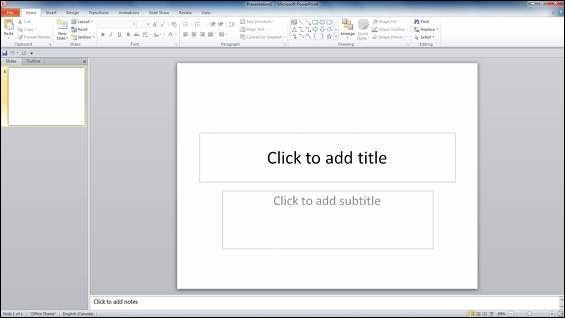
Adding Text in Boxes in Powerpoint

Adding Text in Boxes in Powerpoint

by Oluwaseun | Jun 29, 2019 | Articles and Short Tutorials, Microsoft Powerpoint Articles

PowerPoint allows users to add text to the slide in a well-defined manner to ensure the content is well distributed and easy to read. The procedure to add the text in a PowerPoint slide is always the same – just click in the text box and start typing. The text...
« Older Entries
Next Entries »

CHOOSE A COOURSE

MICROSOFT PROJECT
ORACLE PRIMAVERA P6
AUTOCAD 2D / 3D
ARCHITECTURAL DESIGNER PRO
AUTOCAD PLANT 3D
AUTOCAD P & ID
AUTOCAD CIVIL 3D
AUTOCAD ELECTRICAL
AUTOCAD MECHANICAL
ARCHICAD
AUTODESK INVENTOR
SOLIDWORKS
REVIT ARCHITECTURE
REVIT MEP (Mech,Elect&Plumbing)
REVIT STRUCTURE
3Ds MAX
Comptia A+
Comptia N+
CCNA
ORACLE DATABASE 12C (OCA)
INFORMATION TECHNOLOGY
DESKTOP PUBLISHING
DATA PROCESSING
GRAPHICS DESIGN
DIGITAL MARKETING
ADVANCED EXCEL
SPSS
MICROSOFT OFFICE SUITE
VIDEO EDITING
WEB DESIGN

TUTORIALS

Articles

  • 3dsmax Articles (3)
  • AI Articles (11)
  • Articles and Short Tutorials (323)
  • Autocad Articles (34)
  • Autodesk Inventor Articles (4)
  • Chief Architect Articles (1)
  • Cloud Services Artiles (4)
  • Computer Repairs (Comptia A+) Articles (11)
  • Cybersecurity Articles (11)
  • Data Analysis (48)
  • Data Science (11)
  • Deep Learning Articles (3)
  • Digital Marketing Articles (11)
  • Dynamo Articles (6)
  • Events (1)
  • Graphics Design Articles (33)
  • Information Technology Articles (55)
  • Latest ICT JOBS (81)
  • Microsoft Access Articles (1)
  • Microsoft Excel Articles (75)
  • Microsoft Picture Manager Articles (10)
  • Microsoft Powerpoint Articles (59)
  • Microsoft Project Tutorials and Articles (17)
  • Microsoft Word Tutorials and Articles (35)
  • Mysql Database Articles (12)
  • News and Events (36)
  • Project Management Tutorials and Articles (177)
  • Python (11)
  • Revit Architecture Articles (6)
  • Seminars and Training (1)
  • Structural Analysis Articles (1)
  • Trends (42)
  • Upcoming Classes and Events (41)
  • Web Design Tutorials and Articles (87)

  • 3
  • 1,820
  • 1,466
  • 48,456

Quick Links

Corporate Training

Online Training

Physical Classroom Training

Virtual Training

Faculties

Teaching Methodology

Gallery

Vacancies

Course Categories

Project Management

Computer Aided Design (CAD)

BIM

Data Analysis/Analytics

Software Development

Database Management


Course Categories

Mobile Apps Development

Web Development

Office Productivity

Branding/Graphics

HSE

Get In Touch

Email: training@ictacademy.com.ng

Phone:  08033146625, 08149363925, 08027217145, 08137214950, 08026596871

Lagos Island:  Suite 1F, Lapal House, 235 Igbosere Road, Opposite High Court, Onikan, Lagos Island, Lagos.

Ikeja: 1b, Akin Osiyemi Street, Allen Avenue,  Beside Item 7, First Bank Bus Stop, Ikeja.

Agege:   Suite B28, Primaltek Plaza, Opposite BRT Park, Pencinema, Agege.

Ikorodu – 90, Ayangburen Road, Opposite Cash and Carry, Ikorodu, Lagos State.

  • Facebook
  • X
  • Instagram
Megatek Ict Academy@ 2011 - 2027.......Lagos Island -Suite 1F, Lapal House, 235 Igbosere Road, Opposite High Court, Onikan, Lagos Island ........Ikeja - 1b, Akin Osiyemi Street, Allen Avenue, Ikeja..........Agege - B28, Primaltek Plaza, PenCinema, Agege, Lagos State...........Ikorodu - 90, Ayangburen Road, opposite Cash and Carry, Ikorodu, Lagos State.

WhatsApp us now