
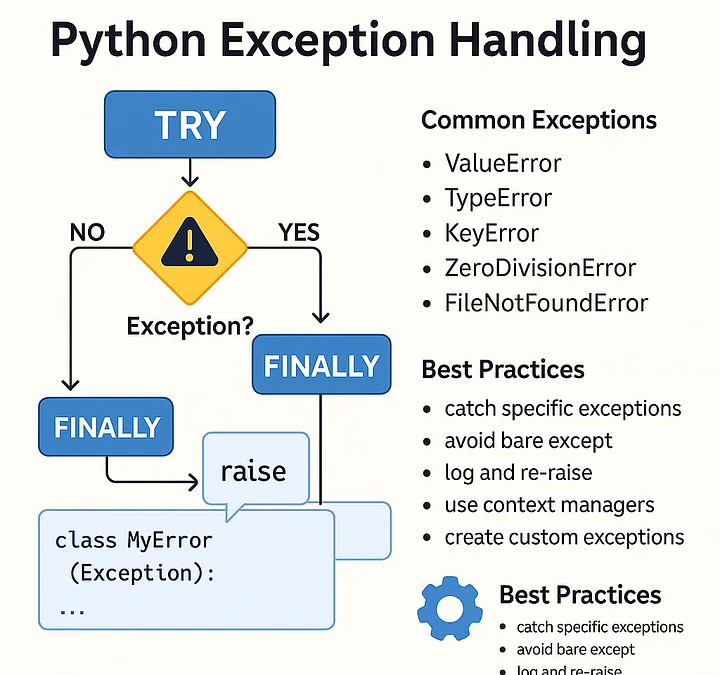
Imagine driving a car that instantly explodes the moment a single sensor detects a low tire pressure. You’d never want to get behind the wheel. In programming, a “crash” is exactly that—a total halt because something unexpected happened. Error Handling is the safety system of your code. It’s the difference between a program that vanishes when a user types a typo and one that politely says, “Hey, that’s not a number; try again.”

The Two Types of Trouble: Syntax vs. Exceptions
Before you can fix errors, you have to know what kind you’re dealing with.
- Syntax Errors: These are “grammar” mistakes. You forgot a colon or misspelled
print. Python can’t even start running your code because it doesn’t understand the instructions. - Exceptions: These happen while the program is running. Your syntax is perfect, but something went wrong—like trying to divide by zero or opening a file that doesn’t exist. These are the errors we “handle.”
The Core Mechanism: try and except
Python uses a specific block of code to catch exceptions before they crash the system. Think of it as a “safety net.”
try: You put the code that might fail here.except: This is the backup plan. If an error happens in thetryblock, Python jumps here immediately.
The Full Safety Suite: else and finally
To write professional-grade code, you often need more than just a simple catch-all. Python provides two more tools to refine your logic:
The else Block This runs only if the code in the try block was successful. It’s a great place for actions that should only happen if no errors occurred, keeping your try block lean.
The finally Block This is the “clean-up” crew. It runs no matter what, whether an error happened or not. It is essential for tasks like closing database connections or shutting down files to prevent memory leaks.
Best Practices: Specificity is Key
A common mistake is using a “bare except,” which catches every single possible error. This is dangerous because it can hide serious bugs you didn’t intend to ignore.
Instead, always aim to catch specific errors:
ValueError: For incorrect data types (e.g., turning “ABC” into an integer).FileNotFoundError: When a file path is wrong.ZeroDivisionError: When math goes wrong.
Putting it into Practice: A Robust Input System
Here is how you handle a common real-world scenario: getting an integer from a user.
Python
def get_age():
    try:
        age = int(input("Please enter your age: "))
    except ValueError:
        print("That's not a valid number! Please use digits.")
    else:
        print(f"Thanks! You are {age} years old.")
    finally:
        print("Age verification attempt complete.")

get_age()
Raising Your Own Errors
Sometimes, Python won’t think something is an error, but you know it is. For example, if a user enters a negative age, Python is fine with it, but your logic isn’t. You can use the raise keyword to manually trigger an exception and force the program to handle it.
Why Error Handling Matters for Your Career
In a professional environment, “unhandled exceptions” are a major liability. Masterful error handling allows you to:
- Improve User Experience: Users stay in the app instead of seeing a scary terminal crash.
- Simplify Debugging: Well-placed error messages tell you exactly what went wrong and where.
- Build Secure Systems: Properly handled errors prevent attackers from seeing “tracebacks” that reveal your internal folder structures or database schemas.
Common Pitfalls to Avoid
- Silent Failures: Using
passin anexceptblock. If you catch an error and do nothing, you’ll have no idea why your program is behaving strangely later on. - Too Much in the
try: Keep yourtryblocks small. If you put 50 lines of code in there, you won’t know which line actually triggered the error.
Conclusion
Error handling isn’t about writing “perfect” code that never fails; it’s about writing “resilient” code that fails gracefully. By anticipating what could go wrong and building safety nets, you ensure your applications are reliable, professional, and user-friendly. Start by adding try-except blocks to your most vulnerable code points—like user inputs and file operations—and watch your software become much more stable.