
In business and data analysis, you often know the result you want, but not the input needed to achieve it. Instead of guessing values repeatedly, Excel provides a powerful tool called Goal Seek.
Goal Seek allows you to work backward — finding the exact input required to reach a desired outcome. This makes it incredibly useful for financial modeling, forecasting, and decision-making.
In this article, you’ll learn how Goal Seek works, when to use it, and how to apply it to real-world scenarios.
What is Goal Seek in Excel?
Goal Seek is a What-If Analysis tool that finds the input value needed to achieve a specific result in a formula.
What it is used for
- Determining required sales to reach a profit target
- Finding interest rates for loans
- Calculating break-even points
- Solving business scenarios without trial and error
How Goal Seek Works
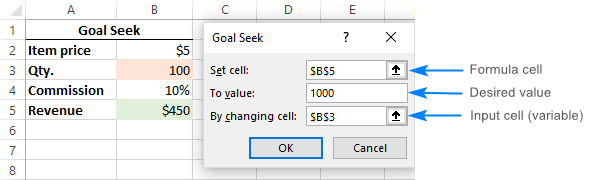
Goal Seek uses three key components:
- Set Cell → The formula cell (result)
- To Value → The desired outcome
- By Changing Cell → The input value Excel adjusts
Excel repeatedly recalculates until it finds a value that meets your target.
Step-by-Step Example
Scenario:
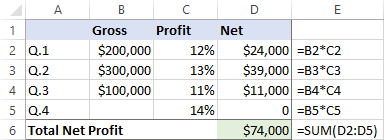
It is a typical business situation – you have the sales figures for the first 3 quarters and you want to know how much sales you have to make in the last quarter to achieve the target net profit for the year, say, $100,000.You want to achieve a profit of ₦500,000, but you don’t know how many units to sell.

Steps:
- Create a formula for profit
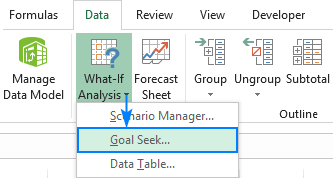
- Go to Data → What-If Analysis → Goal Seek
- Set cell – the formula that calculates the total net profit (D6).
- To value – the formula result you are looking for ($100,000).
- By changing cell – the cell to contain the gross revenue for quarter 4 (B5).
Excel will automatically calculate the required number of units.
Real-World Use Cases
Goal Seek is widely used in:
- Finance → Loan repayment calculations
- Sales → Revenue targets
- Business planning → Break-even analysis
- Education → Solving equations
Limitations of Goal Seek
- Works with only one variable
- Requires a formula already set up
- May not always find a solution
For more complex scenarios, tools like Solver are better.
Best Practices
- Ensure formulas are correct
- Start with realistic values
- Double-check results
Conclusion
Goal Seek is one of the simplest yet most powerful tools in Excel. It eliminates guesswork and helps you make informed decisions quickly.
If you regularly work with targets and projections, mastering Goal Seek is essential.