
To create a table in Microsoft Excel is just as easy as creating it in Microsoft Word. The only difference in both Microsoft office tools is One has grids and cell and the other doesn’t.
- Select a cell in the list of data that you prepared
- On the Ribbon, click the insert tab.
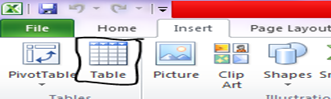
- In the table group, click the table command.
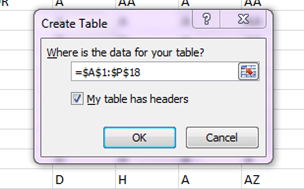
- In create Table dialog box, the range for your data should automatically appear, and the MY TABLE HAS HEADER OPTION is checked. If necessary, you can adjust the range, and check box.
- Click OK to accept these settings.
NOTE: Your table comes out this way for sorting

very easy just like Microsoft word