
Every piece of data stored inside a database has a type: numbers, text, dates, prices, boolean values, and much more. Understanding SQL data types is essential because choosing the right type affects:
- Storage size
- Query performance
- Data accuracy
- Indexing
- How values can be compared or calculated
This article gives you a clear and beginner-friendly breakdown of the most common SQL data types and when to use each one.
What Are SQL Data Types?
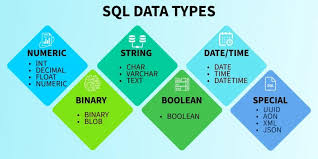
A data type defines the kind of data that a table column can store.
For example:
- Names → stored as text
- Ages → stored as numbers
- Birthdays → stored as dates
- True/false values → stored as boolean
When creating a table, you must specify the data type for each column:
CREATE TABLE Employees (
    EmployeeID INT,
    FirstName VARCHAR(50),
    BirthDate DATE,
    IsActive BIT
);
Choosing the right type prevents errors and ensures accurate data representation.
Numeric Data Types

Numeric data types store numbers used for calculations, measurements, prices, and identifiers.
Integer Types
- INT → Whole numbers (most common)
- SMALLINT → Smaller whole numbers
- BIGINT → Very large whole numbers
Decimal Types
- DECIMAL(p,s) → Exact numeric values for money
- NUMERIC(p,s) → Same as DECIMAL
- FLOAT / REAL → Approximate numeric values
Example:
Price DECIMAL(10,2)
Use DECIMAL for money to avoid rounding errors.
Text Data Types
Text data types store words, descriptions, names, and alphanumeric values.
Main Text Types
- CHAR(n) → Fixed-length text
- VARCHAR(n) → Variable-length text (most common)
- TEXT → Large text blocks
Example:
Email VARCHAR(150)
VARCHAR is recommended for most text storage.
Date and Time Data Types
Date and time values are important for logs, reports, history, scheduling, and analytics.
Common Types:
- DATE → Stores only the date
- TIME → Stores only the time
- DATETIME → Stores date and time
- DATETIME2 → Improved, more precise
- TIMESTAMP → Row versioning
Example:
OrderDate DATETIME2
Using correct date types allows accurate filtering and sorting.
Boolean Data Types
Boolean types store TRUE or FALSE values.
SQL Server uses:
- BIT
- 0 = False
- 1 = True
Boolean values are useful for:
- Active statuses
- Flags
- Conditions
- Toggles
Example:
IsActive BITBinary and File Storage Data Types
These types store non-text data such as:
- Images
- PDFs
- Videos
- Encrypted values
- Files
Types:
- BINARY
- VARBINARY(max)
- IMAGE (deprecated but still used)
Example:
Document VARBINARY(MAX)
These types require careful storage planning due to size.
Specialized Data Types
Some SQL databases include advanced data types for special use cases.
Examples:
- JSON → Stores JSON structures
- XML → Structured XML data
- GEOGRAPHY / GEOMETRY → Spatial data
- UNIQUEIDENTIFIER (GUID) → Universal unique IDs
Example:
UserID UNIQUEIDENTIFIER DEFAULT NEWID()
These types enable modern applications and APIs to store versatile data formats.
How to Choose the Right Data Type
When selecting a data type, consider:
✔ What kind of data is being stored?
Text? Number? Date?
✔ What operations will be performed?
Calculations? Sorting? Searching?
✔ How large can the value become?
Choose INT vs BIGINT, VARCHAR length, etc.
✔ Accuracy requirement
Use DECIMAL for money (not FLOAT).
✔ Storage optimization
Smaller data types improve performance.
Choosing the right type prevents bugs, improves speed, and ensures data integrity.
Conclusion
Data types are the building blocks of every database. They control how data is stored, processed, calculated, and retrieved. Understanding numeric types, text types, date/time formats, boolean fields, and advanced types will help you design better tables and write more efficient SQL queries.
Mastering data types is the first step toward becoming a confident SQL developer, analyst, or database administrator.