
Forecasting is one of the most important skills in business analysis. Organizations constantly ask questions like:
- What happens if sales increase by 10%?
- What if costs rise next quarter?
- How would profit change if pricing is adjusted?
Instead of manually editing numbers repeatedly, Microsoft Excel provides a built-in tool called Scenario Manager.
Scenario Manager allows you to create and compare multiple what-if scenarios without altering your original data.
This article explains what Scenario Manager is, how to use it, and how professionals apply it for forecasting and decision-making.
What Is Scenario Manager?
Scenario Manager is a What-If Analysis tool in Excel that allows you to:
- Create multiple input scenarios
- Store different sets of assumptions
- Compare outcomes automatically
- Generate summary reports
It is ideal for financial modeling, budgeting, forecasting, and risk analysis.
When Should You Use Scenario Manager?
Use Scenario Manager when:
- You want to compare multiple possible outcomes
- You are building financial forecasts
- You need to analyze best-case and worst-case situations
- You are preparing budgets
- You are evaluating investment decisions
For example:
A company wants to test:
- Optimistic Sales Growth
- Expected Sales Growth
- Pessimistic Sales Decline
Scenario Manager allows you to switch between these assumptions instantly.
Example: Simple Profit Forecast Model
Suppose you have:
| Item | Value |
|---|---|
| Revenue | 100,000 |
| Costs | 60,000 |
| Profit | 40,000 |
Profit formula:
=Revenue - Costs
Now you want to test different revenue and cost projections.
Step-by-Step: How to Use Scenario Manager
Step 1: Prepare Your Model
Ensure:
- All formulas are working
- Input cells are clearly defined
- Output cells (like Profit) are linked to inputs
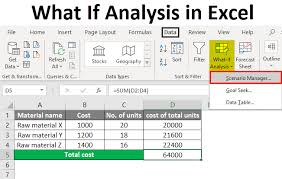
Step 2: Open Scenario Manager
- Go to the Data tab
- Click What-If Analysis
- Select Scenario Manager
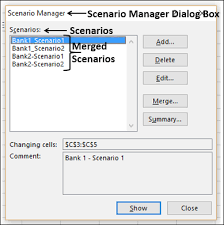
Step 3: Add a New Scenario
Click Add and:
- Name the scenario (e.g., Optimistic)
- Select the changing cells (Revenue and Costs)
- Enter new projected values
Repeat for:
- Expected Scenario
- Pessimistic Scenario
Now Excel stores multiple assumptions.
Switching Between Scenarios
Once scenarios are created:
- Select a scenario
- Click Show
Excel automatically updates the worksheet with those values.
This allows instant comparison without rewriting formulas.
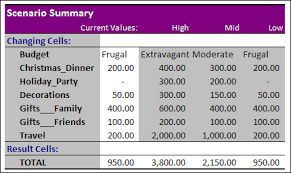
Creating a Scenario Summary Report
Scenario Manager can generate a professional summary report.
Steps:
- Click Summary
- Choose result cell (e.g., Profit)
- Click OK
Excel creates a new worksheet comparing all scenarios side by side.
Best Practices for Forecasting with Scenario Manager
- Keep input cells separate from calculations
- Clearly label assumptions
- Use consistent units
- Test extreme cases
- Avoid hardcoding numbers inside formulas
Organized models improve forecasting accuracy.
Scenario Manager vs Goal Seek vs Data Tables
Excel has three What-If tools:
| Tool | Purpose |
|---|---|
| Scenario Manager | Compare multiple predefined input sets |
| Goal Seek | Find input required to reach a target |
| Data Tables | Analyze range of possible values |
Scenario Manager is best when testing discrete cases like:
- Best case
- Worst case
- Most likely case
Limitations of Scenario Manager
- Limited number of changing cells
- Not ideal for complex dynamic simulations
- Less flexible than advanced financial modeling
For advanced forecasting, tools like:
- Power Pivot
- Solver
- Monte Carlo simulation (via add-ins)
may be more suitable.
Real-World Applications
Scenario Manager is commonly used for:
- Sales forecasting
- Budget planning
- Investment evaluation
- Loan repayment projections
- Risk assessment
In professional finance, comparing scenarios before making decisions reduces uncertainty and improves strategic planning.
Conclusion
Scenario Manager is one of Excel’s most powerful forecasting tools. It allows analysts to test multiple assumptions without rewriting formulas, compare outcomes efficiently, and generate professional summary reports.
For anyone involved in budgeting, financial modeling, or business planning, mastering Scenario Manager is an essential skill.