
The internet contains an enormous amount of valuable information. Businesses, researchers, analysts, and marketers rely on online data to make decisions, monitor trends, track competitors, and identify opportunities.
However, manually collecting data from websites can be extremely time-consuming.
Imagine having to copy product prices from hundreds of web pages, gather job listings from multiple websites, or collect customer reviews one by one. Such tasks can consume hours or even days.
This is where web scraping automation becomes valuable.
Using Python, you can create automated scripts that collect information from websites in seconds, eliminating repetitive manual work and enabling faster data-driven decision-making.
In this article, you’ll learn what web scraping is, how it works, and how Python can automate the collection of online data.
What is Web Scraping?
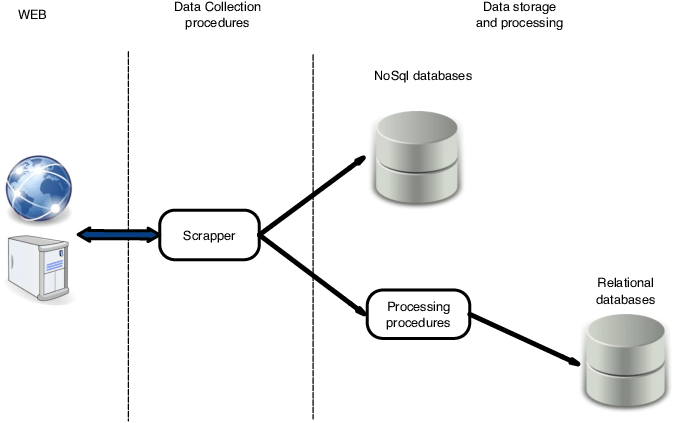
Web scraping is the process of extracting information from websites automatically.
Instead of manually viewing a webpage and copying information, a program retrieves the webpage and extracts the required data.
Common Data Collected Through Web Scraping
Organizations often scrape data such as:
- Product prices
- Customer reviews
- News articles
- Job postings
- Stock market information
- Weather data
- Sports statistics
- Real estate listings
Web scraping transforms websites into valuable data sources.
Why Automate Data Collection?
Many businesses rely on online information for daily operations.
Consider an e-commerce company monitoring competitors.
Every day, an employee may need to:
- Visit competitor websites
- Record product prices
- Track discounts
- Compare inventory levels
Performing this manually is inefficient.
Automation allows a Python script to collect the same information automatically.
Benefits of Automated Data Collection
- Faster data gathering
- Reduced manual effort
- Improved accuracy
- Real-time monitoring
- Scalable processes
Organizations can collect thousands of records within minutes.
How Web Scraping Works
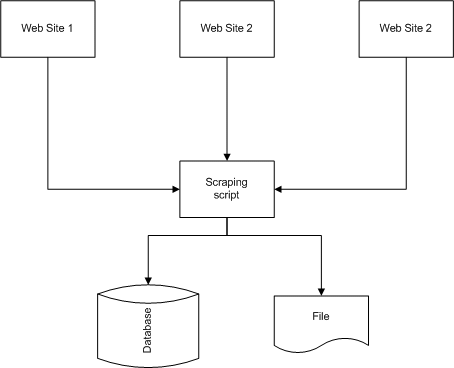
A web scraper typically follows four steps:
Step 1: Request the Web Page
The script sends a request to the website.
Step 2: Download the Page Content
The website responds with HTML.
Step 3: Locate Required Information
The scraper identifies specific elements on the page.
Step 4: Extract and Store Data
The information is saved for analysis.
This process can be repeated automatically across multiple pages.
Understanding HTML Basics
Before scraping websites, it helps to understand HTML.
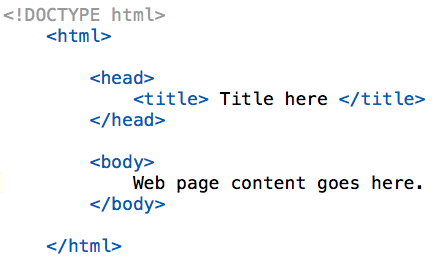
HTML structures webpage content using tags.
Example:
<h1>Product Name</h1>
<p>Price: $100</p>
What This Means
<h1>contains a heading<p>contains paragraph text
Python uses these tags to locate information.
Essential Python Libraries for Web Scraping
Several libraries simplify web scraping.
requests
The requests library downloads webpage content.
Example:
import requests

page = requests.get("https://example.com")
What It Is Used For
- Accessing web pages
- Downloading HTML
- Connecting to websites
BeautifulSoup
BeautifulSoup extracts information from HTML.
Example:
from bs4 import BeautifulSoup
What It Is Used For
- Parsing HTML
- Finding page elements
- Extracting text
These two libraries form the foundation of many scraping projects.
Downloading a Web Page
The first step in scraping is retrieving the page.
Example:
import requests

url = "https://example.com"

response = requests.get(url)

print(response.text)
What This Does
The script:
- Connects to the website
- Downloads HTML content
- Displays the page source
The downloaded content can then be analyzed.
Parsing HTML with BeautifulSoup
After downloading the page, BeautifulSoup helps interpret the HTML structure.
Example:
from bs4 import BeautifulSoup

soup = BeautifulSoup(response.text, "html.parser")
What It Is Used For
Converts raw HTML into an object that can be searched easily.
This makes extracting data much simpler.
Extracting Page Titles
One of the simplest scraping tasks is retrieving a page title.
Example:
title = soup.title.text

print(title)
What It Is Used For
Extracts the title displayed in the browser tab.
This demonstrates how specific page elements can be accessed.
📸 Insert Image: HTML Structure Example
Extracting Product Information
Suppose a website contains product listings.
Python can collect:
- Product names
- Prices
- Ratings
- Availability
Example:
products = soup.find_all("div", class_="product")
What It Is Used For
Finds all product sections on the page.
The scraper can then extract details from each section.
Scraping Multiple Pages
Most websites contain multiple pages of data.
Instead of scraping one page manually, Python can automate the process.
Example:
for page in range(1, 11):
    print(page)
What It Is Used For
Loops through multiple pages automatically.
This allows thousands of records to be collected efficiently.
Saving Scraped Data
After collecting information, it should be stored for analysis.
Common formats include:
- CSV
- Excel
- Databases
Example:
import pandas as pd

df.to_csv("products.csv")
What It Is Used For
Saves extracted data into a CSV file.
This file can be analyzed later using Excel or Python.
Handling Dynamic Websites
Some websites load content using JavaScript.
In these cases, requests and BeautifulSoup may not be enough.
Tools such as Selenium are often used.
What Selenium Is Used For
- Clicking buttons
- Filling forms
- Loading dynamic content
- Navigating websites
Selenium behaves like a real browser.
Web Scraping Ethics and Legal Considerations
Not all websites allow scraping.
Before scraping a website:
- Read the website’s terms of service
- Check robots.txt guidelines
- Avoid excessive requests
- Respect privacy regulations
Responsible scraping helps avoid legal and technical issues.
Real-World Applications of Web Scraping
E-Commerce
Businesses monitor:
- Competitor pricing
- Product availability
- Market trends
Recruitment
Companies gather:
- Job postings
- Salary information
- Industry demand data
Finance
Analysts collect:
- Stock information
- Market news
- Economic indicators
Research
Researchers gather:
- Academic information
- Survey data
- Public records
Web scraping provides access to large amounts of publicly available information.
Common Challenges in Web Scraping
Website Structure Changes
Websites often update layouts.
A scraper that worked yesterday may fail today.
Anti-Scraping Measures
Some websites use:
- Captchas
- IP blocking
- Rate limiting
Data Quality Issues
Collected data may contain:
- Missing values
- Duplicates
- Formatting inconsistencies
These issues often require additional cleaning.
Best Practices
To build reliable scraping systems:
- Respect website policies
- Limit request frequency
- Store data systematically
- Handle errors gracefully
- Test scripts regularly
Good practices improve reliability and sustainability.
Conclusion
Web scraping automation allows organizations to collect online information quickly and efficiently. Instead of manually copying data from websites, Python can automate the entire process, saving time and improving accuracy.
With libraries such as requests and BeautifulSoup, professionals can gather valuable information from public websites and transform it into useful datasets for analysis. Whether tracking competitors, monitoring market trends, or collecting research data, web scraping has become an essential skill for modern data professionals.
When combined with responsible practices and proper data management, web scraping can provide powerful insights and support better business decisions.