
Web scraping is the process of automatically extracting data from websites for analysis, reporting, or integration into applications. Python, with its libraries like BeautifulSoup, provides a powerful and beginner-friendly way to scrape structured web data efficiently.
This article explains how to get started with BeautifulSoup, key techniques, and best practices for web scraping in Python.
Why Web Scraping Matters
Web scraping allows analysts and developers to:
- Collect real-time or large-scale datasets from websites
- Automate data collection for repetitive tasks
- Extract structured information like tables, lists, and product details
- Supplement datasets for analytics, machine learning, or reporting
Manual data collection is time-consuming and prone to error. BeautifulSoup enables automated, accurate, and repeatable data extraction.
Installing and Setting Up BeautifulSoup
BeautifulSoup works with Python and requests library to fetch and parse web content.
Installation steps:
pip install beautifulsoup4
pip install requests
Then import the libraries in your Python script:
import requests
from bs4 import BeautifulSoup
These libraries allow you to send HTTP requests to websites and parse HTML content into Python-readable structures.
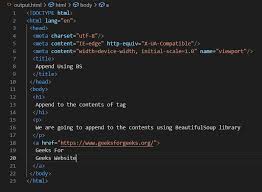
Fetching Webpage Content
- Send a request to the target URL:
url = "https://example.com"
response = requests.get(url)
html_content = response.text
- Parse HTML content using BeautifulSoup:
soup = BeautifulSoup(html_content, "html.parser")
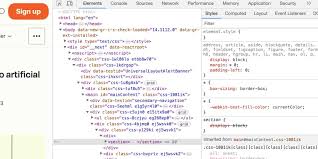
- Inspect the HTML structure of the website to identify tags, classes, or IDs containing the data you want.
Extracting Data with BeautifulSoup
Accessing Elements
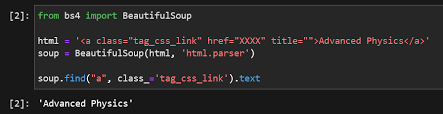
- Find a single element:
title = soup.find("h1").text
- Find multiple elements:
items = soup.find_all("div", class_="product")
for item in items:
    print(item.text)
Navigating HTML
- Use
soup.select()with CSS selectors for precise targeting - Access attributes using
element['href']orelement.get('src')
These methods let you extract the exact information you need, such as product names, prices, or links.
Storing Scraped Data
Once data is extracted, it can be stored in formats suitable for analysis:
- CSV – Easily opened in Excel or Pandas
import csv

with open("data.csv", "w", newline="") as file:
    writer = csv.writer(file)
    writer.writerow(["Product", "Price"])
    for item in items:
        writer.writerow([item.text, item['data-price']])
- Pandas DataFrame – Ideal for further analysis
import pandas as pd

data = []
for item in items:
    data.append({"Product": item.text, "Price": item['data-price']})

df = pd.DataFrame(data)
df.to_csv("data.csv", index=False)
Best Practices for Web Scraping
- Respect the website’s robots.txt and terms of service
- Avoid sending too many requests in a short period — use
time.sleep() - Handle exceptions and errors to avoid script crashes
- Keep your code modular and reusable for multiple pages
- Consider using BeautifulSoup + Selenium for dynamic pages
These practices prevent your scraping from being blocked and ensure ethical data collection.
Common Mistakes to Avoid
- Scraping without checking website permissions
- Hardcoding URLs instead of making scripts dynamic
- Ignoring missing elements or broken links
- Extracting data without proper cleaning or validation
Avoiding these mistakes ensures your scraped datasets are complete and usable.
Conclusion
Web scraping with Python and BeautifulSoup is a valuable skill for data analysts, data scientists, and developers. By fetching, parsing, and storing web data efficiently, you can automate repetitive tasks and gather large datasets for analysis. Mastering BeautifulSoup not only saves time but also enables richer insights by turning web data into actionable information.