

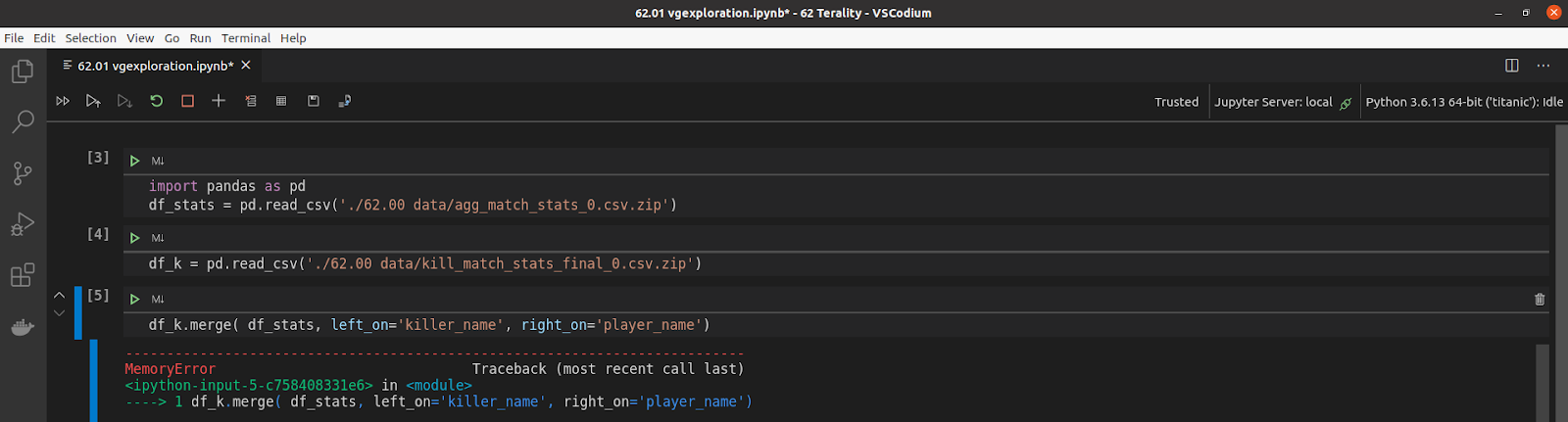
Working with massive datasets can feel like trying to fit an ocean into a glass. When your data exceeds your computer’s RAM, Python will throw the dreaded Memory Error. However, by using strategic loading techniques and efficient data types, you can process millions of rows on a standard laptop. This guide covers how to transition from “out of memory” to “out of the box” performance.

The Memory Bottleneck
A common misconception is that if a CSV file is 1GB on your disk, it will take 1GB of RAM. In reality, Python’s Pandas library often consumes 3 to 10 times the file size due to object overhead and inefficient default types. To avoid crashes, we must move away from the “load everything at once” mentality.
1. Downcasting: Optimizing Data Types
By default, Pandas often uses 64-bit types (like float64 or int64) even if the data doesn’t require that much precision. Reducing these to 32-bit or 8-bit types can slash memory usage by over 50%.
Python
import pandas as pd
import numpy as np

# Load a sample of data to inspect types
df = pd.read_csv('massive_data.csv', nrows=100)

# Manually specify smaller types
dtype_dict = {
    'id': np.int32,
    'price': np.float32,
    'category': 'category' # Categorical types are massive memory savers
}

df_efficient = pd.read_csv('massive_data.csv', dtype=dtype_dict)
print(f"Memory Usage: {df_efficient.memory_usage(deep=True).sum() / 1e6:.2f} MB")
Useful for: Reducing the footprint of static datasets that almost fit in memory but need a “squeeze.”
2. Chunking: Processing in Bite-Sized Pieces
If the dataset is simply too large to fit in RAM even after downcasting, you should process it in “chunks.” Instead of loading the whole file, you iterate through blocks of rows, perform your calculation, and store only the results.
Python
chunk_size = 10000
total_sum = 0

# Use a generator to iterate through the file
for chunk in pd.read_csv('massive_data.csv', chunksize=chunk_size):
    # Process each piece (e.g., calculate a sum or filter)
    total_sum += chunk['sales'].sum()

print(f"Total Sales: {total_sum}")
Useful for: Aggregations (sums, averages) and filtering where you don’t need to see the whole dataset at once.
3. Efficient File Formats: Parquet and Feather
CSV files are human-readable but computationally expensive to parse. Binary formats like Parquet are columnar, meaning Python only reads the specific columns you need into memory, rather than the entire row.
Python
# Convert CSV to Parquet for future use
df = pd.read_csv('data.csv')
df.to_parquet('data.parquet')

# Load only the columns you actually need
df_subset = pd.read_parquet('data.parquet', columns=['user_id', 'transaction_value'])
Useful for: Speeding up I/O operations and reducing disk-to-RAM overhead.
4. Leveraging Dask for Parallel Computing
When Pandas hits its limit, Dask takes over. Dask mimics the Pandas API but works by breaking the dataframe into smaller pieces under the hood and distributing tasks across all your CPU cores.
Python
import dask.dataframe as dd

# Dask doesn't load the data yet (Lazy Evaluation)
ddf = dd.read_csv('multiple_large_files_*.csv')

# Operations are defined, then executed only when .compute() is called
result = ddf.groupby('category').price.mean().compute()
Useful for: Datasets that are larger than RAM but smaller than your hard drive space.
5. Memory-Mapped Files with NumPy
For numerical data, numpy.memmap allows you to map a large file on disk into an array in memory. The OS only loads the specific segments of the file into RAM as they are accessed, effectively using your hard drive as virtual memory.
Python
import numpy as np

# Create a memory-mapped array
data = np.memmap('large_matrix.dat', dtype='float32', mode='r', shape=(1000000, 1000))

# Accessing a slice only loads that specific part into RAM
slice_of_data = data[500:600, :]
Common Pitfalls to Avoid
Even with these tools, certain habits can lead to silent memory leaks:
- In-Place Operations: Using
inplace=Truedoesn’t always save memory in Pandas; it often creates a hidden copy anyway. - Global Variables: Large dataframes stored in global variables stay in RAM forever. Wrap your processing in functions so memory is cleared when the function finishes.
- Object Types: Avoid the
objectdtype for strings whenever possible; use thestringorcategorytypes introduced in newer Pandas versions.
Conclusion
Handling large datasets in Python is less about having a bigger machine and more about being a smarter pilot. By downcasting types, chunking your logic, and switching to columnar formats like Parquet, you can process millions of data points without ever seeing a “Memory Error” again.