

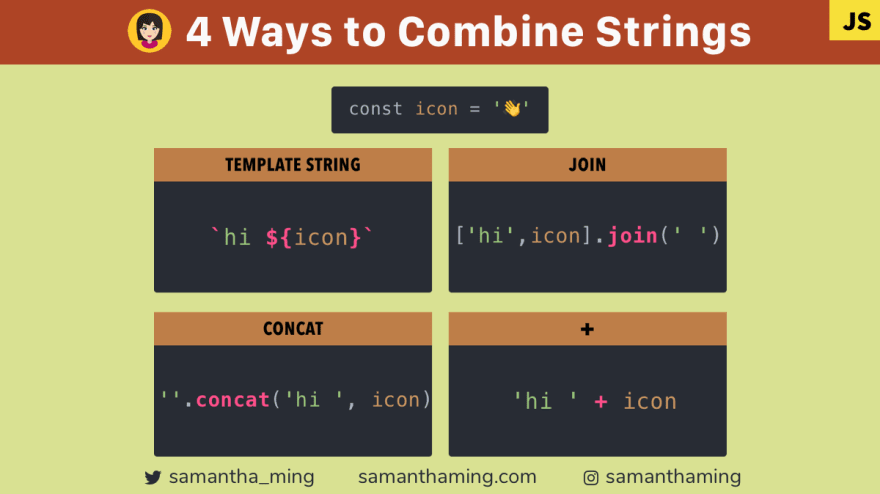
Here are four ways to combine strings in JavaScript. My favorite way is using Template Strings. Why? Because it’s more readable, no backslash to escape quotes, no awkward empty space separator, and no more messy plus operators 👏
const icon = '👋';// Template Strings
`hi ${icon}`;// join() Method
['hi', icon].join(' ');// Concat() Method
''.concat('hi ', icon);// + Operator
'hi ' + icon;// RESULT
// hi 👋
1. Template Strings
If you come from another language, such as Ruby, you will be familiar with the term string interpolation. That’s exactly what template strings is trying to achieve. It’s a simple way to include expressions in your string creation which is readable and concise.
const name = 'samantha';
const country = '🇨🇦';
Problem of Missing space in String concatenation
Before template strings, this would be the result of my string 😫
"Hi, I'm " + name + "and I'm from " + country;
☝️ Did you catch my mistake? I’m missing a space 😫. And that’s a super common issue when concatenating strings.
// Hi, I'm samanthaand I'm from 🇨🇦
Resolved with Template Strings
With template strings, this is resolved. You write exactly how you want your string to appear. So it’s very easy to spot if a space is missing. Super readable now, yay! 👏
`Hi, I'm ${name} and I'm from ${country}`;
2. join()
The join method combines the elements of an array and returns a string. Because it’s working with array, it’s very handy if you want to add additional strings.
const instagram = '@samanthaming';
const twitter = '@samantha_ming';
const array = ['My handles are ', instagram, twitter];const tiktok = '@samantaming';array.push(tiktok);array.join(' ');// My handles are @samanthaming @samantha_ming @samanthaming
Customize Separator
The great thing about join is that you can customize how your array elements get combined. You can do this by passing a separator in its parameter.
const array = ['My handles are '];
const handles = [instagram, twitter, tiktok].join(', '); // @samanthaming, @samantha_ming, @samanthamingarray.push(handles);array.join('');// My handles are @samanthaming, @samantha_ming, @samanthaming
3. concat()
With concat, you can create a new string by calling the method on a string.
const instagram = '@samanthaming';
const twitter = '@samantha_ming';
const tiktok = '@samanthaming';'My handles are '.concat(instagram, ', ', twitter', ', tiktok);// My handles are @samanthaming, @samantha_ming, @samanthaming
Combining String with Array
You can also use concat to combine a string with an array. When I pass an array argument, it will automatically convert the array items into a string separated by a comma ,.
const array = [instagram, twitter, tiktok];'My handles are '.concat(array);// My handles are @samanthaming,@samantha_ming,@samanthaming
If you want it formatted better, we can use join to customize our separator.
const array = [instagram, twitter, tiktok].join(', ');'My handles are '.concat(array);
// My handles are @samanthaming, @samantha_ming, @samanthaming
4. Plus Operator (+)
One interesting thing about using the + operator when combining strings. You can use to create a new string or you can mutate an existing string by appending to it.
Non-Mutative
Here we are using + to create a brand new string.
const instagram = '@samanthaming';
const twitter = '@samantha_ming';
const tiktok = '@samanthaming';const newString = 'My handles are ' + instagram + twitter + tiktok;
Mutative
We can also append it to an existing string using +=. So if for some reason, you need a mutative approach, this might be an option for you.
let string = 'My handles are ';string += instagram + twitter;// My handles are @samanthaming@samantha_ming
OH darn 😱 Forgot the space again. SEE! It’s so easy to miss a space when concatenating strings.
string += instagram + ', ' + twitter + ', ' + tiktok;// My handles are @samanthaming, @samantha_ming, @samanthaming
That feels so messy still, let’s throw join in there!
string += [instagram, twitter, tiktok].join(', ');// My handles are @samanthaming, @samantha_ming, @samanthaming
Escaping Characters in Strings
When you have special characters in your string, you will need to first escape these characters when combining. Let’s look through a few scenarios and see how we can escape them 💪
Escape Single Quotes or Apostrophes (‘)
When creating a string you can use single or double quotes. Knowing this knowledge, when you have a single quote in your string, a very simple solution is to use the opposite to create the string.
const happy = 🙂;["I'm ", happy].join(' ');''.concat("I'm ", happy);"I'm " + happy;// RESULT
// I'm 🙂
Of course, you can also use the backslash, \ , to escape characters. But I find it a bit difficult to read, so I don’t often do it this way.
const happy = 🙂;['I\'m ', happy].join(' ');''.concat('I\'m ', happy);'I\'m ' + happy;// RESULT
// I'm 🙂
Because Template strings is using backtick, this scenario doesn’t apply to it 👍
Escape Double Quotes (“)
Similar to escaping single quotes, we can use the same technique of using the opposite. So for escaping double quotes, we will use single quotes.
const flag = '🇨🇦';['Canada "', flag, '"'].join(' ');''.concat('Canada "', flag, '"');'Canada "' + flag + '"';// RESULT
// Canada "🇨🇦"
And yes, can also use the backslash escape character.
const flag = '🇨🇦';['Canada "', flag, '"'].join(' ');''.concat('Canada "', flag, '"');'Canada "' + flag + '"';// RESULT
// Canada "🇨🇦"
Because Template strings is using backtick, this scenario doesn’t apply to it 👍
Escape backtick (`)
Because Template strings is using backticks to create its string, when do want to output that character, we have to escape it using backslash.
const flag = '🇨🇦';`Use backtick \`\` to create a template string`;// RESULT
// Use backtick `` to create a template string
Because the other string creations are not using backtick, this scenario doesn’t apply to them 👍
Which way to use?
I showed a few examples of using the different ways of concatenating strings. Which way is better all depends on the situation. When it comes to stylistic preference, I like to follow Airbnb Style guide.
When programmatically building up strings, use template strings instead of concatenation. eslint: prefer-template template-curly-spacing
So template strings for the win! 👑
Why the other ways still matter?
It’s still important to know the other ways as well. Why? Because not every code base will follow this rule or you might be dealing with a legacy code base. As a developer, we need to be able to adapt and understand whatever environment we’re thrown in. We’re there to problem solve not complain how old the tech is lol 😂 Unless that complaining is paired with tangible action to improve. Then we got progress 👏